Knowing when your server is down before your users do is the bare minimum of responsible self-hosting. I have tried several monitoring approaches and settled on a setup that is simple, free, and has been reliable for months.
Uptime Kuma
Uptime Kuma is the core of my monitoring stack. It is a self-hosted monitoring tool that checks HTTP endpoints, TCP ports, DNS records, and ping targets at configurable intervals.
Installation is one Docker command:
docker run -d --restart=always -p 3001:3001 \
  -v uptime-kuma:/app/data \
  --name uptime-kuma louislam/uptime-kuma:1
After setup, the web dashboard shows the status of all monitored services at a glance.
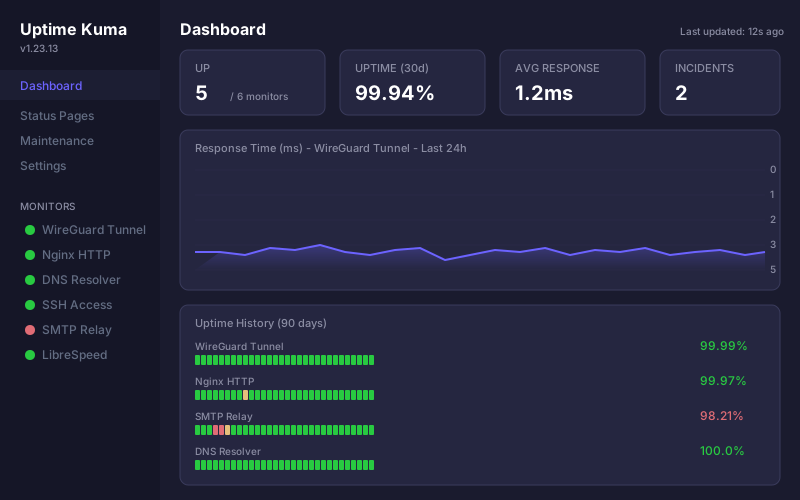
What I monitor
My current setup tracks:
- HTTPS endpoints for all sites hosted on the server, checking every 60 seconds
- TCP port checks for SSH (port 22) and other services
- Certificate expiry — Uptime Kuma warns when TLS certificates are approaching expiration
- DNS resolution — verifying that DNS records resolve correctly
- Ping to the server itself as a basic connectivity check
Each monitor can have its own check interval. I use 60 seconds for critical services and 300 seconds for things that are less urgent.
Notifications
Uptime Kuma supports many notification channels. I use two:
- Email via an external SMTP provider for critical alerts
- Webhook to a simple script that logs events for later review
The notification setup is straightforward through the web interface. You can configure different notification channels per monitor, so you are not overwhelmed with alerts for non-critical services.
External monitoring
There is an inherent problem with self-hosted monitoring: if the server goes down, the monitoring goes down with it. For this reason, I also use a free external service to monitor the server from outside.
Several free options exist:
- Hetrix Tools — free tier includes 15 monitors with 1-minute intervals from multiple locations
- Uptime Robot — free tier with 5-minute intervals for up to 50 monitors
- Cronitor — free tier for basic uptime checks
I run one of these as a complement to Uptime Kuma. The external service watches the server itself. Uptime Kuma watches everything running on it. Between the two, coverage is solid.
Simple health checks
For services that do not expose an HTTP endpoint, I use a small health check script that runs via cron:
#!/bin/bash
# Check if critical services are running
services=("nginx" "docker")
for svc in "${services[@]}"; do
    if ! systemctl is-active --quiet "$svc"; then
        echo "$svc is not running" | mail -s "Service alert: $svc" admin@packetlog.org
    fi
done
This runs every five minutes and sends an email if a systemd service stops. It catches cases that network-level monitoring might miss — like a service crashing but the server staying up.
Tracking response time
Beyond simple up/down status, Uptime Kuma records response times for each check. Over time, this data reveals patterns. I have noticed my server’s response time creeping up on a few occasions, which turned out to be a log file filling the disk and an unoptimized cron job running during peak hours.
The response time graphs are useful for spotting these slow degradations that would not trigger a down alert but still affect performance.
Status pages
Uptime Kuma can generate a public status page showing the current state of your services. I do not use this publicly, but it is a nice feature if you run services for others and want to provide transparency about uptime.
What I have learned
After running this setup for several months:
- 60-second check intervals are a good default. Faster than that is unnecessary for most self-hosted services, and slower means you might miss brief outages.
- Alert fatigue is real. Start with notifications only for genuinely critical services. I initially set up alerts for everything and quickly started ignoring them.
- External monitoring is not optional. You need at least one check from outside your infrastructure. The free tiers of external services are sufficient for this.
- Log your incidents. When something goes down, write a brief note about what happened and what you did to fix it. This pays off when the same issue recurs months later.
The total resource cost of Uptime Kuma on my VPS is about 80 MB of RAM. For the peace of mind it provides, that is a reasonable trade.